Initial Sync
The sync settings can be accessed under Configuration → Web services → Eduframe → Eduframe Service.
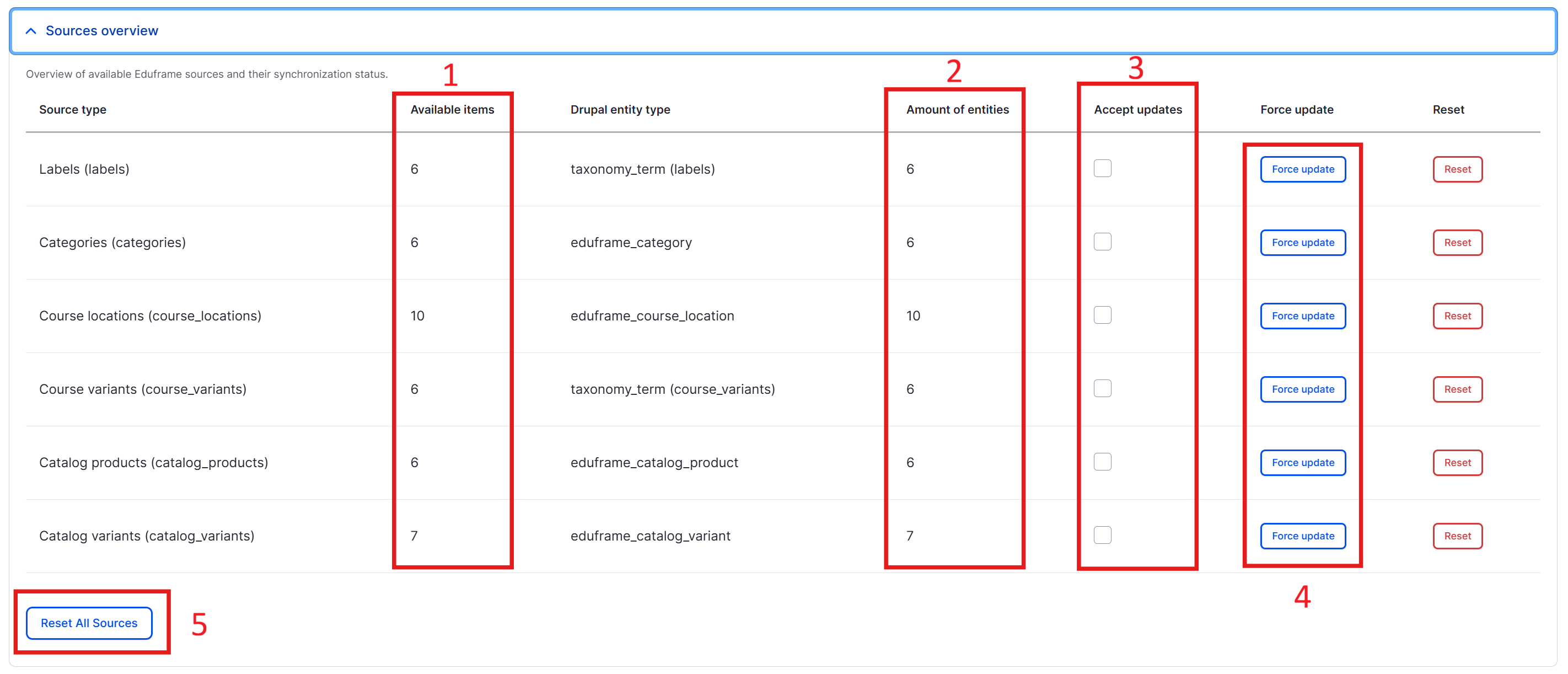
Explanation of Red Marked Items
-
Total count of the items in Eduframe that have been published: This indicates how many items are currently published in the Eduframe system, providing a quick overview of the content available to users.
-
Total count of the items in the Eduframe Drupal Module: This shows the total number of items that are part of the Eduframe Drupal Module, helping users understand the scope of the module's content. If your system is up to date, these numbers will match the numbers in the column Available Items.
-
Enable/Disable receiving webhook updates for this entity: This option allows users to toggle whether they want to receive updates via webhooks for a specific entity. This only works if you correctly configured your webhook in Eduframe. See webhooks for more information.
-
Force update all of these entities in place: This button allows users to force an update of all related entities without removing them first, ensuring that the latest data from Eduframe is reflected in the module.
-
Remove all entities and recreate them after a full sync: This option will delete all existing entities and recreate them from scratch after a full synchronization. This should only be used in exceptional cases or when performing the first full sync after installing the module.